
GeoInTime workforce and operations platform
From your team’s attendance… to a clearer view of work.
Attendance starts the story. Operations are the full picture.
Knowing your team showed up is not enough. What matters is the context of the work: sites, people, tasks and the information you need before deciding.
- The field
- The information
- The decision
YOUR WORLD / YOUR BUSINESS
Every day brings a situation.Every situation needs visibility.
Pick the question closest to your work. We’ll show the reference screen linked to it, without assuming every scenario is available with the same settings.



START FROM YOUR BUSINESS
Think through the problemfrom a clearer screen.
The difference isn’t the number of screens. It’s knowing the right screen for your company’s question. Tell us the challenge that matters and request a demo built around your actual need.

GEOINTIME / REQUEST A DEMO
Request a demo for your business.
Enter your contact details and the challenge that matters most. We save your request for the GeoInTime team and prepare a WhatsApp message you can review and send yourself.
PRODUCT / REAL INTERFACES
See the work from inside the system.Not from promises on a page.
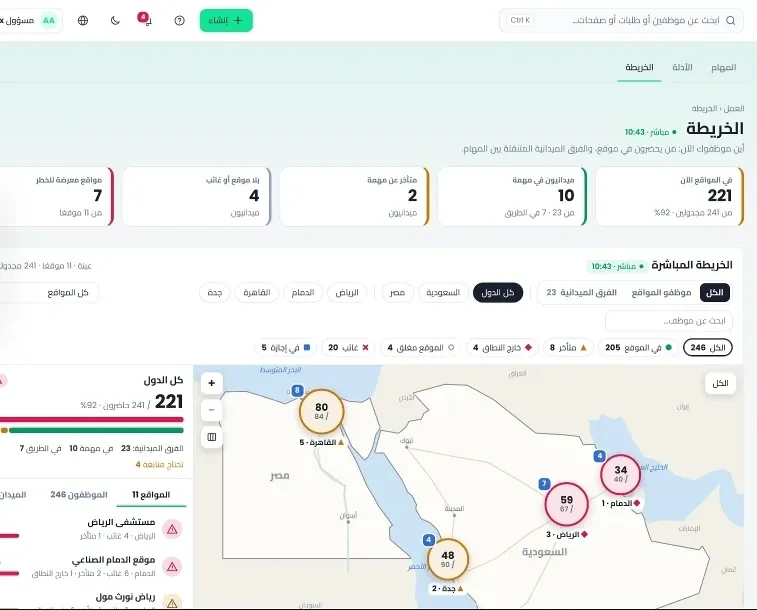
These are interface captures from GeoInTime’s introductory material. Choose an area, open the screen and see the information you’ll discuss in the demo.
01 / OPERATIONS
From one place… follow how your sites are running.
A reference screen showing work status, sites and the data you can review from the operations center.
- Operational status
- Site information
- Drill into details
Screens are reference captures from the GeoInTime profile, not a live test of the current version or proof that every function is enabled for every customer.
- Employee
- Shift
- Attendance
- Site
- Task
- Documentation
- Review
FROM FIELD TO CLARITY
Not just data.Context that helps you ask the right question.
An exploration path showing how you can start from an operational question, see the related screen and discuss your team’s needs in a tailored demo.
Discuss your scenario with us- 01
Define the challenge
A site, team, attendance or task that needs follow-up.
- 02
See a real screen
Browse the reference captures on this page.
- 03
Request a demo for your case
Share your business context to discuss which settings and functions fit.
GEOINTIME / THE NEXT MOVE
From attendance… to a clearer view.
GeoInTime for managing workforce, attendance, sites and tasks.
Start from your operations